
Project went sideways? We step in and get it back on track.
See Project Rescue →This company moved terabytes of data every month, through a Mac Mini in their office. One minute, clients were uploading photos to it. Ten minutes later, nothing was accepting those connections.
In this series, we walk through project rescues we’ve done for our clients. The video above is the full version. This is the written one, with the same diagrams.
Overview
The client is a US-based photo editing company. Photographers from all over the world send in their photos, and an in-house team edits them.
When they came to us, their website was down, and that website was the central point of their operations. Clients submitted orders through a form and downloaded the finished files from the app.
So everything turned into manual work. The team was handling client complaints, sending finished files over Dropbox, and taking new orders through different kinds of file upload. It was hectic, and it hurt their reputation.
Discovery
We always start with discovery: what’s running, who’s left to ask, and what actually broke.
What Was Running
This system was heavy on file transfer. It moved terabytes of data a month: raw photos from clients to the editing team, then finished files back to the clients.
It had three parts:
- A WordPress site: the marketing site, and also the client portal.
- A file server: a Mac Mini in the office. All the files went straight to it, over a consumer-grade fiber connection.
- A third-party task tool: it ran the team’s workflow. Nothing was wrong with it.
Who Was Left to Ask
Nobody. The team that built the software was no longer around, so there was no one to support the company during the downtime.
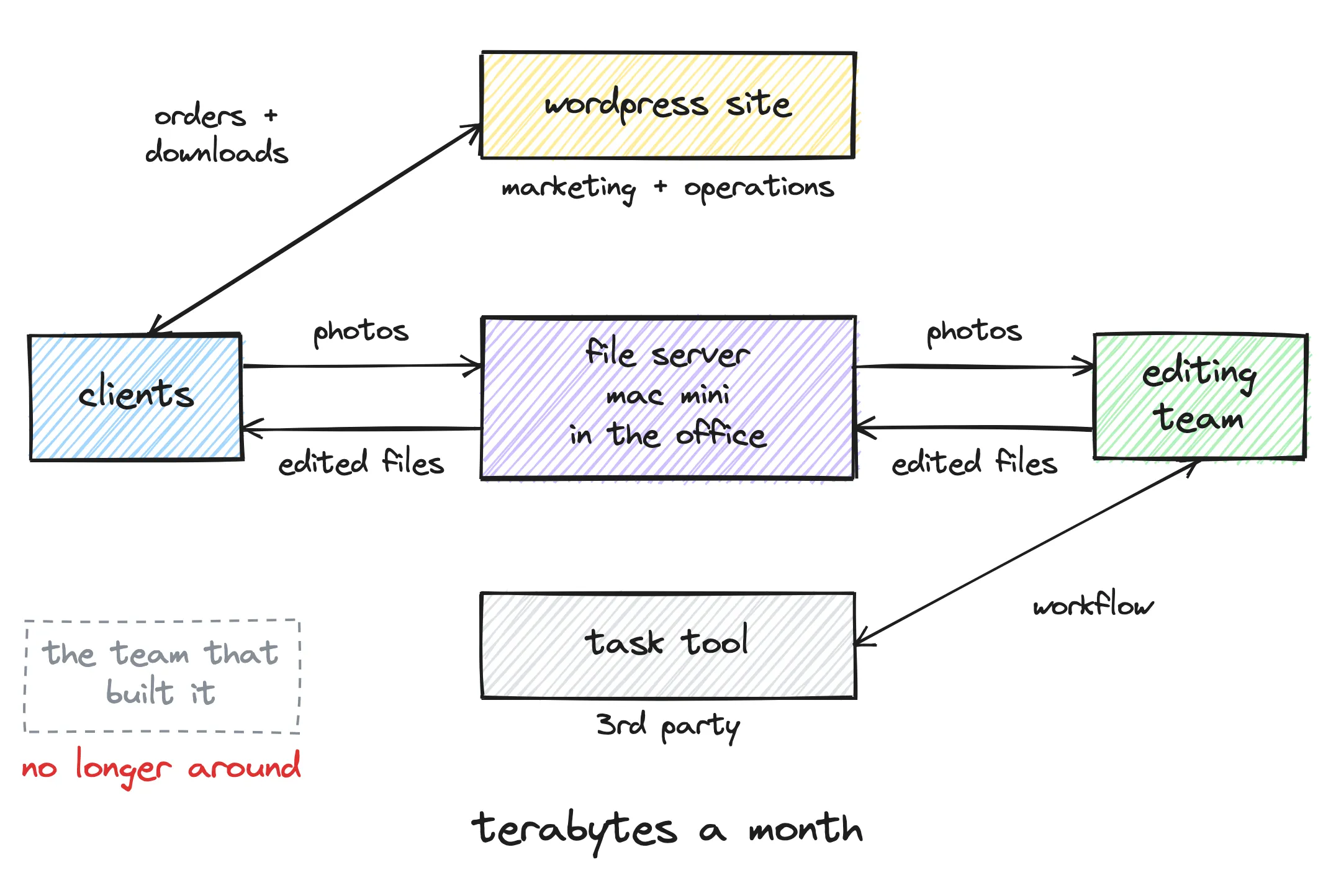
How the system fit together. All the files went through the Mac Mini, and the team that built it was gone.
What Broke
We got access to the servers, and their team walked us through the system on calls. While doing that, we debugged it live: logs, the database and every request coming through, compared with what should have been happening.
The root cause was a system upgrade. An update on the Mac Mini wiped out the web server, the part that answers when a client connects. It was an external package, and it wasn’t configured to survive the update.
One minute, it was accepting all the connections. Ten minutes later, it was gone. Clients could still log in, but no files were available and uploads failed. Nobody knew what was going on.
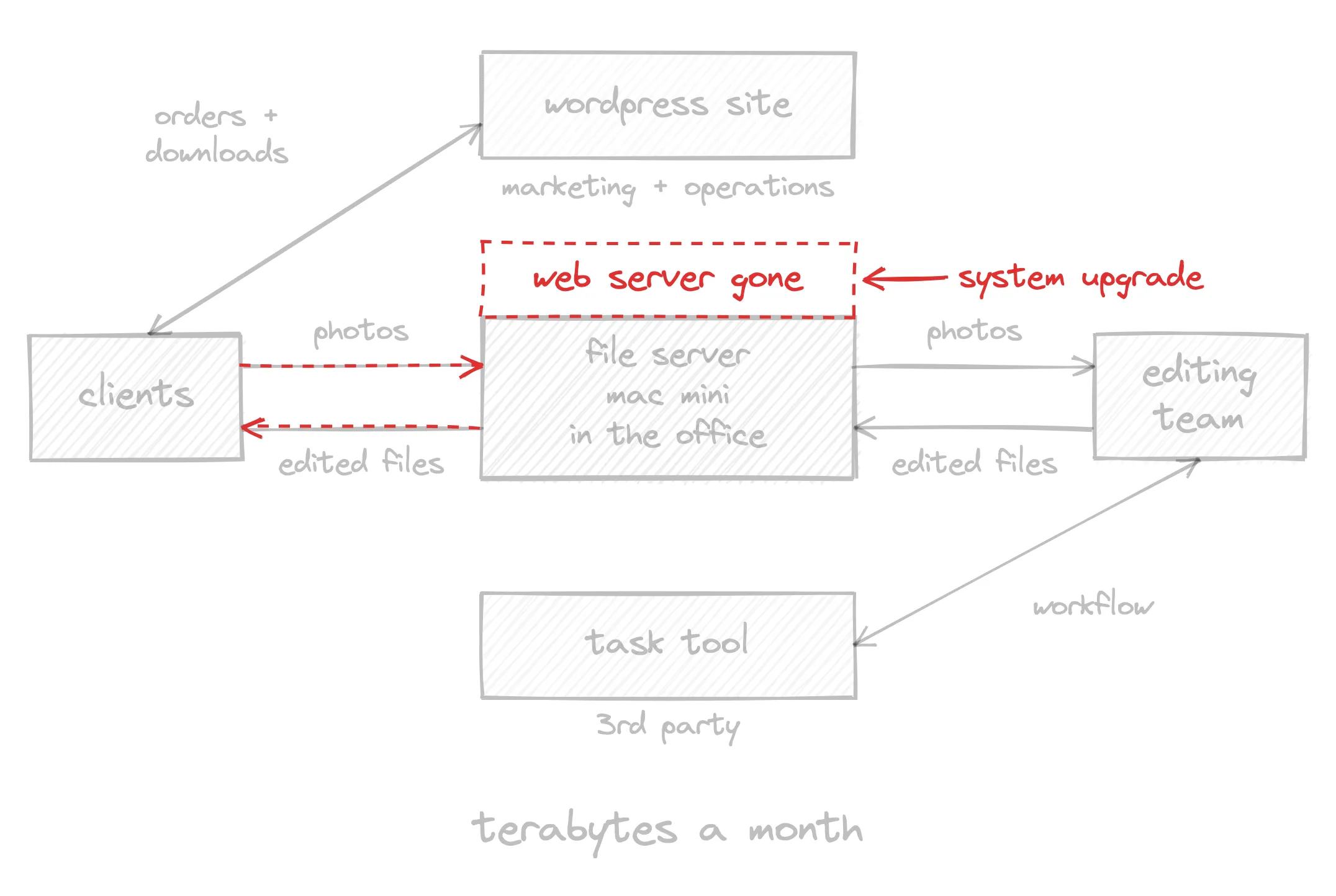
The upgrade removed the web server, so clients couldn’t reach the file server anymore.
The Plan
We set three goals, in this order:
- Immediate need: fix the server, so the business could operate again.
- Short-term goal: make sure it doesn’t happen again.
- Long-term goal: make the platform scalable and add new features.
The company already had the long-term goal in mind, but at that moment it wasn’t the most important part.
Stage 1: Put Out the Fire
It took us less than a day to get the system back up. We logged in to the server, installed the services it needed, made sure it was secure, and pointed everything to the right places. Clients could submit their photos again.
Then we set up monitoring, so the next problem wouldn’t come as a surprise. We wrote scripts that checked the vitals of each component (the WordPress site, the web server and the task tool) and plugged them into uptime monitoring software. If the WordPress site was running out of storage, or the task tool integration stopped working, the team got text messages and emails. They knew before their clients did.
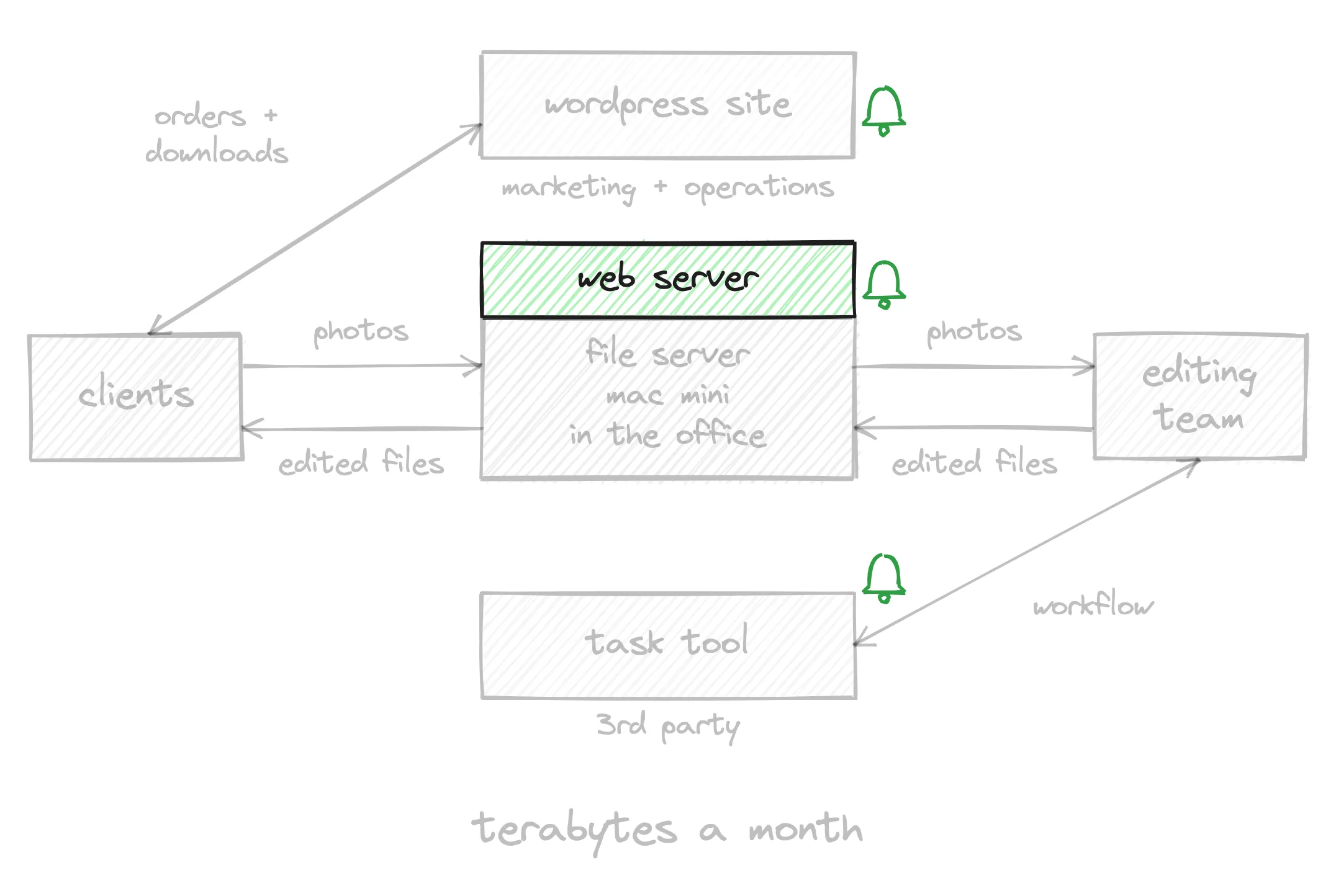
The web server back in place, and an alert on every component.
Stage 2: Move the File Server
Once the fire was out, we could take a breath and look at why the system was so shaky.
The reason was a single point of failure: when one thing breaks, everything stops. Here, it was a Mac Mini and an office internet connection, handling terabytes of data. That kind of consumer-grade setup was never made for that much traffic.
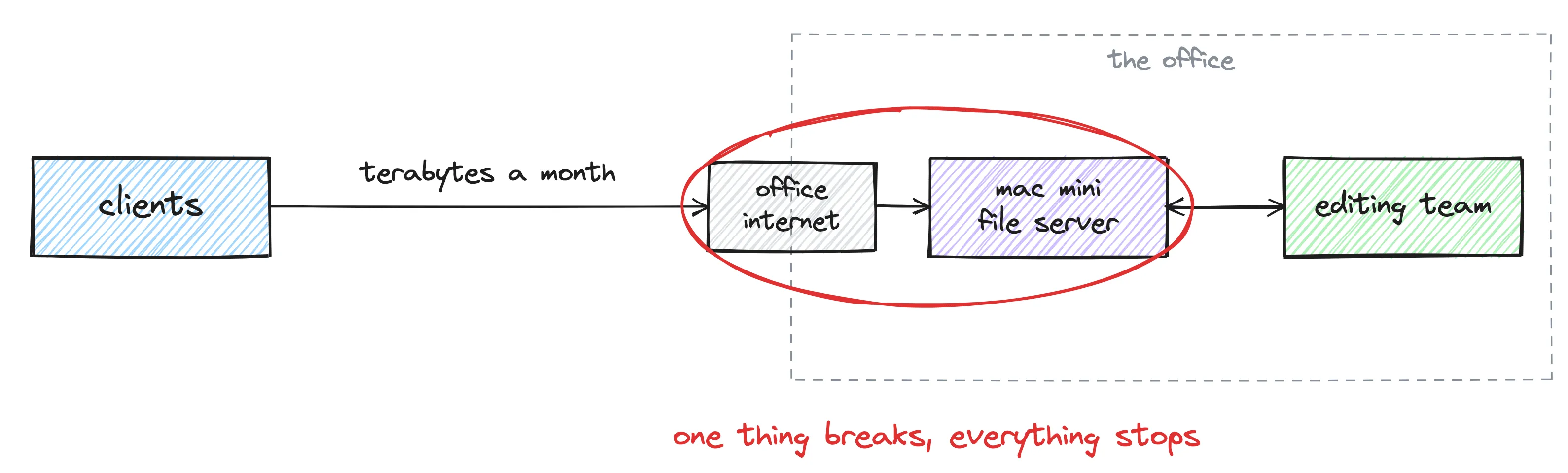
The weak spot: one machine and one office connection, between the clients and the team.
So within the next two weeks, we moved the file transfer part to the cloud, to AWS.
We didn’t rebuild anything. We just moved it to a different place. The single point of failure remained, but that place was much more reliable: it’s less likely that a server or an internet connection goes down at AWS than at your office.
We also set up a sync between AWS and the server in the office, so the company’s operations didn’t have to change at all. The team found the files in the same place as before.
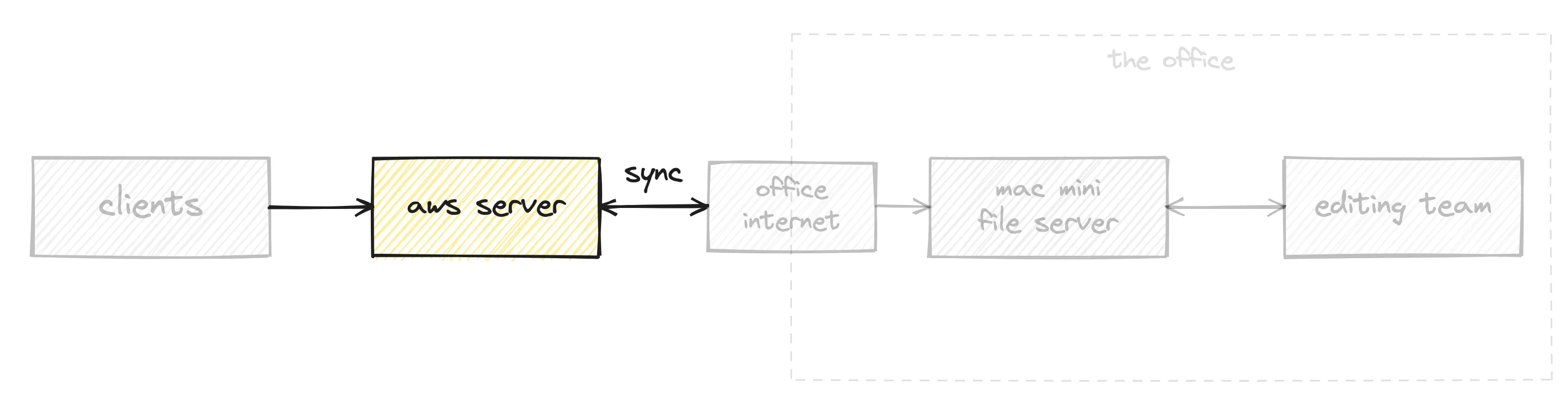
Clients upload to AWS, and a sync brings the files to the office. Nothing changes for the team.
Now the office could fail without clients noticing. If the Mac Mini went down, or the office lost its internet connection, clients kept uploading to AWS, and the team could download the files directly from there.
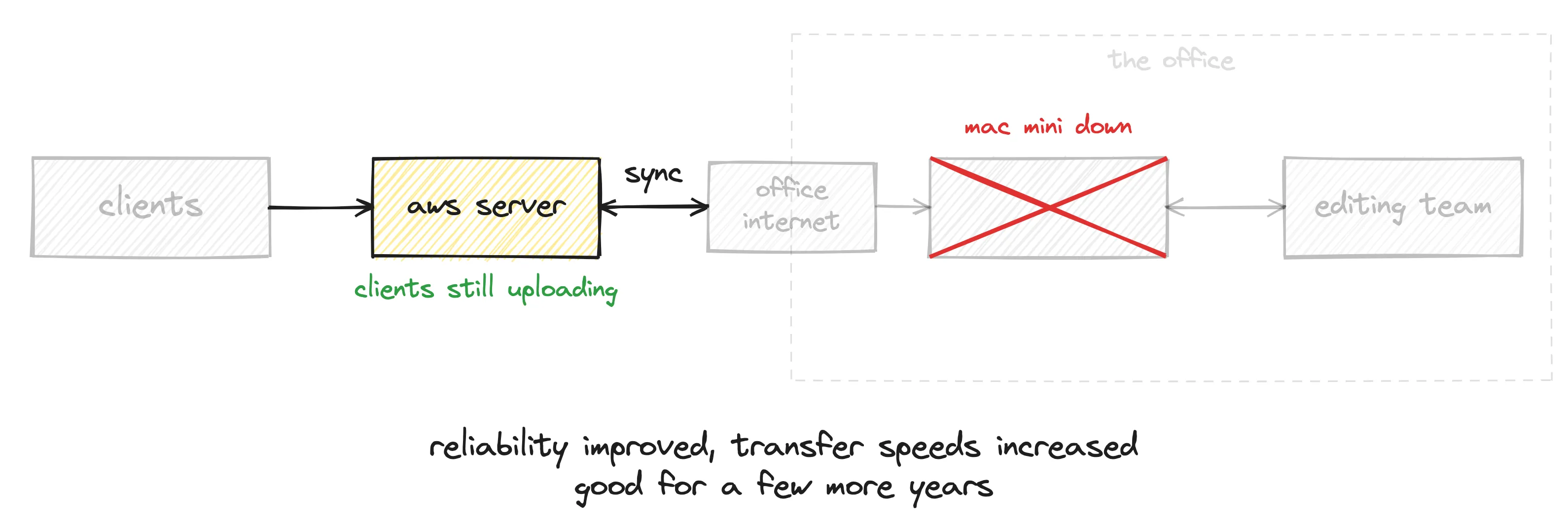
Mac Mini down, clients still uploading.
Reliability improved, and transfer speeds went up too. This step alone allowed the company to function for a few more years, before they decided to modernize properly.
Project went sideways? We step in and get it back on track.
See Project Rescue →Stage 3: Modernize the Software
When they were ready, we completely rebuilt the system with a different approach, fully in the cloud. The details are in the full case study, so here’s just the main idea.
Before, every client shared one server. Now, every client goes straight to cloud storage, so they all upload at full speed, with no single bottleneck in the way.
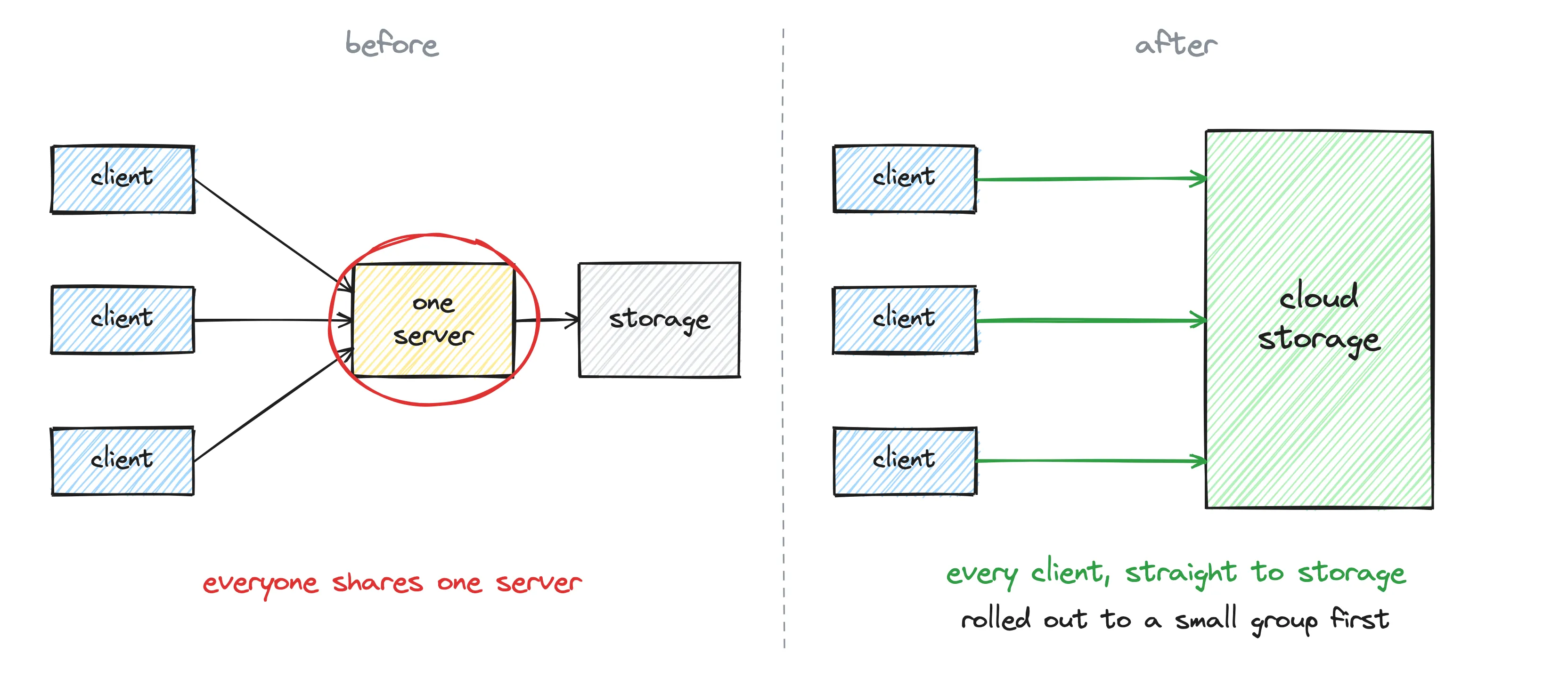
Before: one shared server. After: a direct path to cloud storage for every client.
We didn’t switch everyone at once. A small group of clients went first, then the rest, while the business kept running.
Outcome
A couple of years after the modernization:
- No major outages on the client side.
- 10x transfer speed, using the full capacity of the cloud.
- A smaller cloud bill: from $1,500 a month to about $300. That’s over $14,000 saved every year, just on infrastructure.
The Takeaway
Less than a day to put out the fire. Two weeks to buy a few more years. A full rebuild when the company was ready.
A rescue is three decisions, in order. Each one buys time for the next.
If Your Project Went Sideways
This one was an outage. Yours might look different:
- Every fix breaks something else, and your customers can see it.
- You’ve been told “almost done” for three months.
- The old vendor is the only one holding the keys to your own product.
That’s what Project Rescue is for: when a software project goes sideways, we step in and get it back on track.
Project went sideways? Start with a 30-minute call.
See Project Rescue →