
The free self-check prompt. One page, ready to run on your code.
Get the Prompt →Why We Made It Short
We heavily leverage AI prompts for auditing codebases. We use them for our clients, and for regular checkups of our own work. Our prompts are significantly more extensive and run way longer, but that’s ok: in this case we want people to know whether they carry huge technical debt. It surprises us how many companies and startups, in the era of AI and basically free tests and automations, have literally zero coverage.
What It Checks
Six foundations, each graded from what’s in the code:
- Project Map: how many systems you have, what they’re built with, how big and important they are, and whether that technology is still supported and getting updates.
- Unit tests: small automatic checks that each piece of code does what it should. Without them, changing one thing risks breaking something else.
- Security basics: passwords stored securely, no credentials or API keys in the repository, login built on a proven method, and libraries kept up to date.
- Engineering habits: whether the repository is clean enough for someone else to jump into the code and make changes.
- Release automation: a new version goes live the same safe way every time, no matter who deploys it.
- End-to-end tests: tests that click through your product like a real user and make sure it works as expected.
Most are close to yes or no: if one is missing, that’s where to start.
How to Run It
- Put all your repositories in one folder. Clone them if you can. A ZIP download works too, but it has no history, so the history questions come back as “Can’t tell”.
- Get Claude, Codex or a similar AI coding tool. For Claude, a paid plan is needed; Pro is enough. Install the desktop app, open the Code tab, and select the folder.
- Turn off training on your code. In Claude, go to Settings, then Privacy, and switch off “Help improve our AI models”. Check the same kind of setting in other tools.
- Paste the prompt and run it. In Claude, pick the newest Opus model. It usually takes minutes, and longer on very big codebases.
The free self-check prompt. One page, ready to run on your code.
Get the Prompt →How to Read the Results
The report opens with a scorecard. Green means the foundation is in place, yellow means partly, red means missing, and gray means the AI couldn’t tell from the code.
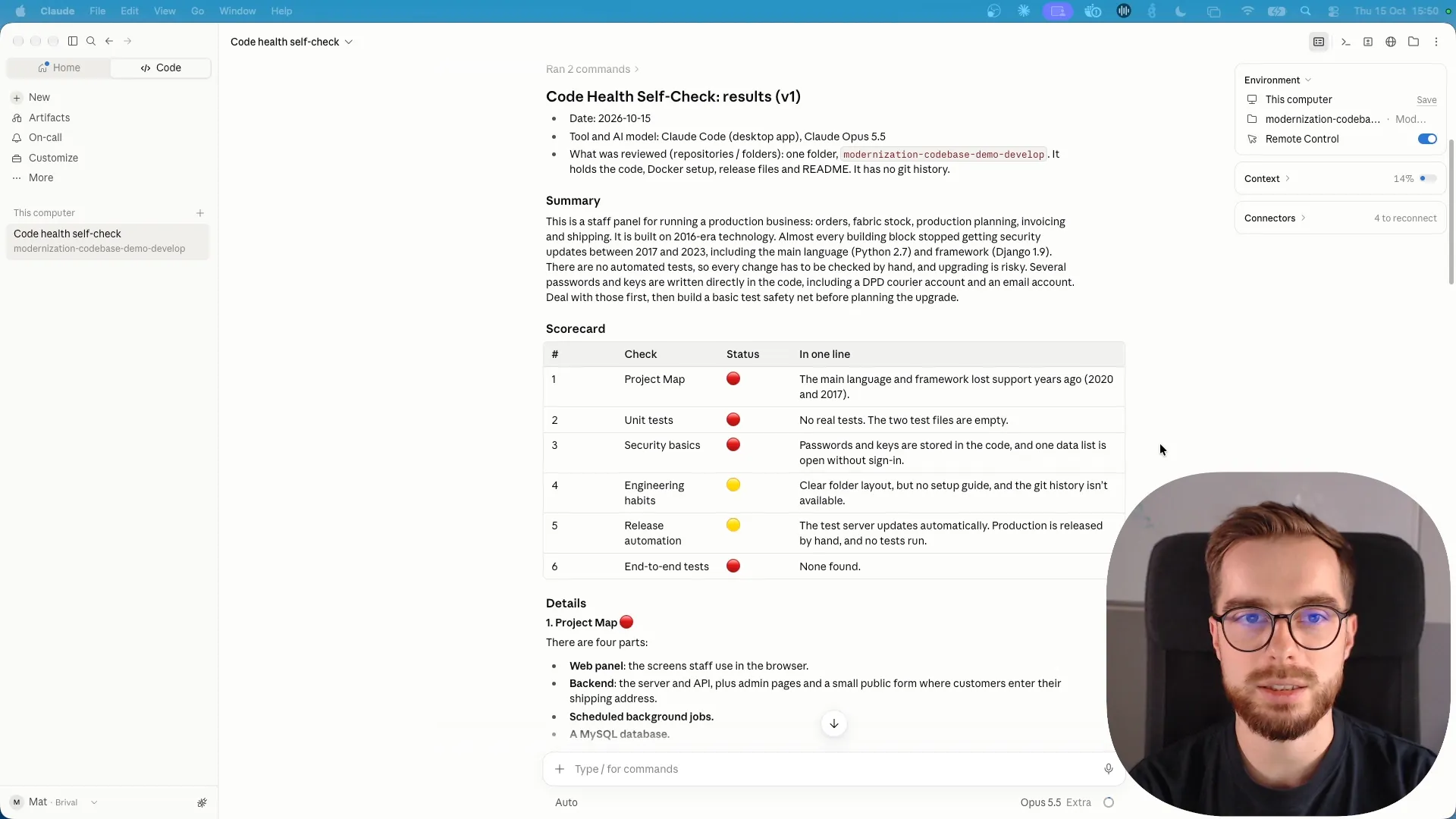
Then you have three options:
- Read it yourself. It’s written for people who aren’t technical.
- Give it to your team, so they can act on what it found.
- Send it to us. We’ll walk you through it on a free 30-minute call: what’s critical, what can wait, and what it would take to fix.
Got your report? Send it to us for a free 30-minute walkthrough.
Send Your Results →What It Isn’t
It’s a first look, not a full audit. AI can miss things, and a “Missing” may mean the thing lives somewhere the prompt couldn’t see. Our code audit goes further: a senior engineer reads the code, the infrastructure and the delivery process, and it’s free for now. What it covers is in What a Code Audit Actually Covers.